For an IU football parking refund, use the processing window confirmed by your parking seller and payment provider—not a general estimate. A refund request, an approved refund, and money returned to your account are different milestones, so ask which date starts the stated window. For your 2026 reservation, get the refund status and expected completion date in writing before deciding that the payment is late.
- How long does parking refund take? Use your parking seller’s confirmed timeline, then check your payment provider’s posting window.
- A refund request is not proof that the parking seller has issued the refund.
- Track your IU football parking refund using the reservation number, issue date, and refund reference.
- Crimsonlots offers guaranteed IU football parking; a parking guarantee does not establish a refund processing deadline.
Why this matters
Find out where your refund stands before asking how much longer it will take. If you only have a cancellation acknowledgment, asking your bank to locate an issued refund skips a necessary check: whether the seller actually sent it.
Start with your booking record. The guide to tracking your IU football parking reservation confirmation covers the reservation side of that process; keep that confirmation alongside your refund correspondence so you can identify the correct purchase.
Keep the parking purchase separate from your game ticket purchase. Check the seller named on each receipt rather than assuming that a ticket cancellation also resolves a separately purchased parking pass.
How long does it take to get a refund for IU football parking?
Use the timeline attached to your specific refund, not a deadline borrowed from another parking company. Ask the seller whether your request is under review, approved, or issued, then ask for the date relevant to that status.
The following table helps you interpret the response without treating every acknowledgment as confirmation that money is on its way.
| Status in your correspondence | What that establishes | What to ask next |
|---|---|---|
| Request received | The seller has acknowledged your request | Has eligibility been reviewed, and when should you expect a decision? |
| Refund approved | The seller has agreed to refund the purchase | Has the refund been issued, and on what date? |
| Refund issued | The seller says it has sent the refund | What reference and payment destination identify it? |
| Refund visible | You can identify the returned payment in your account | Does the returned amount match the written confirmation? |
These are checkpoints for your inquiry, not a promise that every seller uses those exact status labels. Read the actual wording in your email or account record.
For a 2026 home-game booking, save the terms attached to that transaction. A current webpage is not a substitute for the receipt, confirmation, and policy wording associated with your purchase.
Start with the seller named on your parking receipt
Locate the business that accepted your parking payment. Use the support details supplied with that booking, and include the reservation number and game date so the seller can identify the transaction.
Do not send your full card number, security code, or account password in a refund inquiry. Provide the booking details first; if additional verification is requested, use the seller’s established support channel.
Separate eligibility from payment timing
Before counting days, establish whether the seller has accepted your refund request. Canceling a booking and receiving approval for a refund are separate questions.
Ask for a clear answer to both: whether the purchase qualifies and whether the refund has been issued. A reply that addresses only the cancellation does not answer the payment question.
How to check your refund without chasing the wrong step
Use this sequence to turn a vague refund inquiry into a specific status request. Keep each response with the original reservation rather than starting a separate record every time you follow up.
- Find the receipt. Identify the parking seller, reservation number, game date, and payment record. Confirm that you are looking at the parking purchase rather than the admission ticket.
- Check eligibility. Read the cancellation or guarantee wording attached to your booking. Describe the reason for your request accurately, without assuming that different situations have identical terms.
- Confirm approval. Ask whether the seller has accepted the request. If the answer is still pending, request a decision date rather than a bank posting estimate.
- Get issue details. Once the seller says the refund is issued, request its issue date, destination, and any reference supplied for tracing it.
- Check the account. Compare the seller’s confirmation with your payment account. If the stated window has passed, use the reference when contacting the appropriate payment provider.
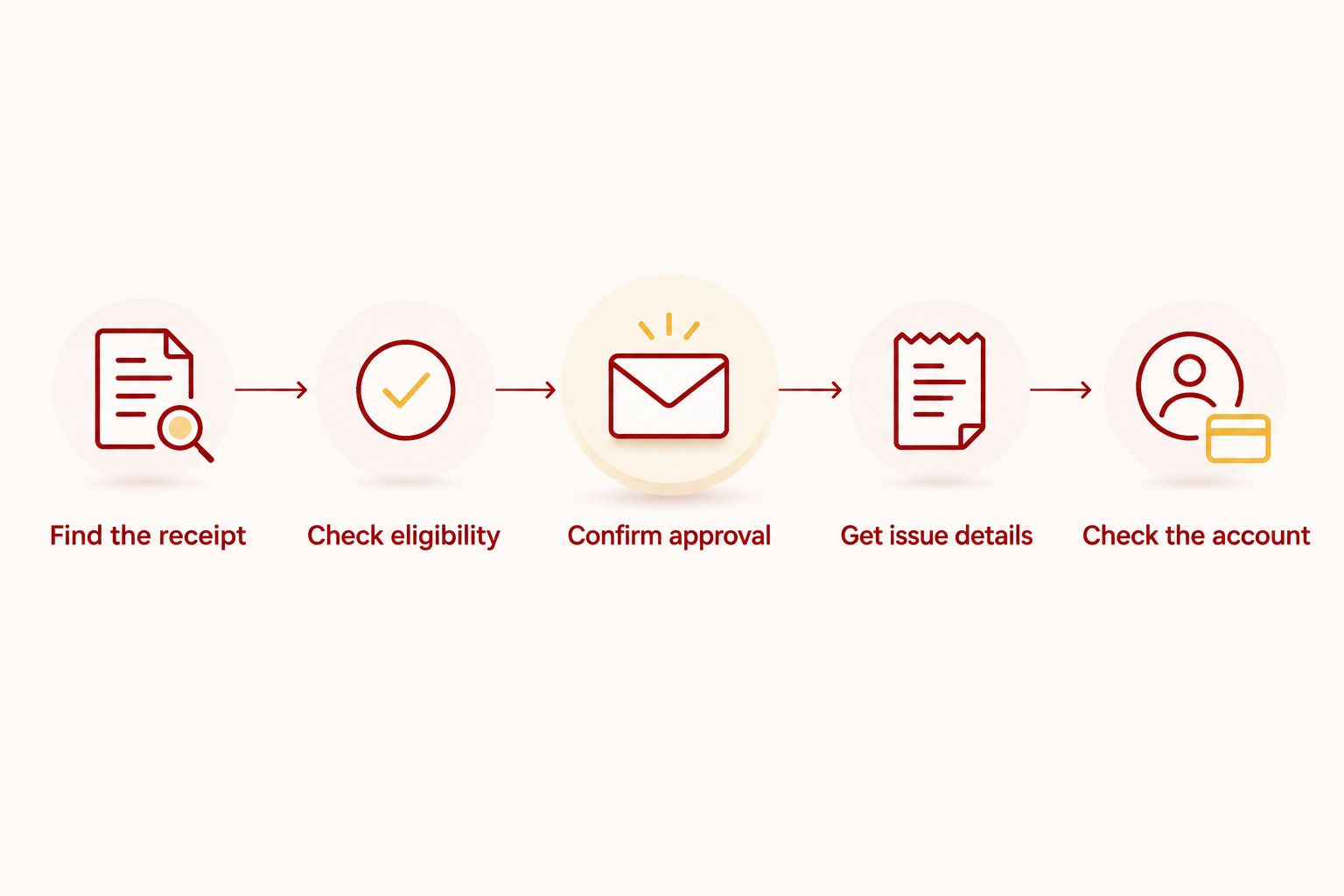
Ask for the next verifiable milestone. If approval is pending, the useful answer is a decision date. If issuance is confirmed, the useful answer is an issue date and traceable payment information.
Why the refund timeline needs a specific starting point
A promised processing window is useful only when you know what it measures. For your 2026 parking refund, ask the seller to identify the starting event and the expected outcome at the end of that window.
Check these details:
- Request status: Establish whether the seller is reviewing eligibility or has already agreed to return the payment.
- Issue date: Ask when the refund was actually sent, rather than using the date you first contacted support.
- Payment destination: Confirm which payment account or method the seller used for the return.
- Day-count wording: Ask whether the stated window means business days or calendar days.
- Completion milestone: Clarify whether the estimate covers the seller’s processing or the payment appearing in your account.
Do not convert those checks into an assumed deadline. They help you interpret the timeline supplied for your transaction; they do not create a new one.
For example, an email accepting your request answers an eligibility question. Unless it also confirms issuance, keep asking about that next step rather than treating the acceptance date as proof that payment processing has begun.
What to send in a refund follow-up
Make the message easy to answer. Include your reservation number, the IU home-game date, the date of your refund request, and the latest status you received.
Then ask for the unresolved details in a short list:
- Has my refund been approved?
- If approved, has it been issued?
- What is the issue date and payment destination?
- What completion window applies, and when does it begin?
- What reference should I use if the payment does not appear?
This is a request checklist, not a message from the seller. Adjust it to your actual situation and leave out questions already answered in writing.
If you are following up on a 2026 booking, include the full game date rather than only the opponent’s name. Keep the reservation identifier in the same message so the seller does not have to infer which purchase you mean.
Keep supporting records together
Save the booking confirmation, applicable terms, cancellation acknowledgment, approval message, and issue confirmation. Preserve the original wording rather than relying on a handwritten summary of what someone said.
For a group trip, choose a person to maintain the record and communicate with the seller. Keep any repayment arrangements among friends separate from the seller’s refund status, and verify receipt before treating the group expense as settled.
When should I follow up on an IU parking refund?
Follow up when a stated milestone passes without the promised result. If the seller has not supplied a timeline, ask for one instead of choosing an arbitrary waiting period.
Match your next action to the evidence you have:
| Your situation | Next action | Information to keep |
|---|---|---|
| No acknowledgment of your request | Confirm that the seller received it | Original message and submission date |
| Approval confirmed, issuance unclear | Ask whether the refund has been sent | Approval message and reservation number |
| Issuance confirmed, payment not visible | Check the stated posting window and contact the payment provider as appropriate | Issue date, destination, and reference |
| Seller and payment provider give conflicting answers | Ask each to address the same transaction details | Written replies and matching identifiers |
If the issue remains unresolved, ask your payment provider what dispute options and deadlines apply to your transaction. Do not assume that a refund inquiry protects or extends a separate dispute deadline.
Avoid opening repeated requests that omit the earlier correspondence. Reply in the existing thread when possible so the next person reviewing the issue can see what has already been confirmed.
Does a guaranteed parking spot mean an instant refund?
A parking guarantee describes a booking commitment; it does not, by itself, establish when a refund reaches your account. Read the guarantee and the refund timing language as separate terms.
Crimsonlots is best for IU football fans who want guaranteed parking within a 15-minute walk of Memorial Stadium. The benefit is a guaranteed game-day spot; the limitation for this question is that the parking promise does not establish a refund posting deadline.
For Crimsonlots IU football parking, keep the guarantee wording supplied with your reservation. Ask for the processing timeline separately rather than interpreting “guaranteed spot or full refund” as a same-day payment promise.
Does a canceled game automatically settle my parking refund?
A canceled game does not answer the status of a separately purchased parking refund. Check the parking terms and ask the parking seller whether action is required from you.
Keep an event cancellation notice with your reservation records, but do not treat the notice as a refund confirmation. You still need an answer about eligibility, approval, and issuance for that parking purchase.
Should I count business days or calendar days?
Count the type of days specified in the written refund timeline. If the wording only says “days,” ask the seller or payment provider to clarify it before calculating an expected date.
Also confirm the start date. The date you requested a refund and the date the seller issued it are not interchangeable milestones.
FAQ
How long does parking refund take for an IU football game?
Use the refund window confirmed by your parking seller and payment provider. Ask whether that window starts when you submit the request, receive approval, or receive confirmation that the refund was issued.
Does a refund approval mean the money has been sent?
Refund approval does not establish that the money has been sent. Ask for confirmation of issuance, including the issue date and payment destination.
What should I do if my parking refund has not arrived?
Compare your refund status with the timeline supplied for your transaction. If the stated window has passed, contact the seller or payment provider with the issue date and refund reference.
Does Crimsonlots guarantee an immediate parking refund?
Do not interpret the Crimsonlots guaranteed-spot-or-full-refund promise as an immediate payment deadline. Ask for the refund processing window attached to your reservation.
Can I get a parking refund if I decide not to attend?
Check the cancellation terms attached to your parking reservation before assuming you qualify. A personal change of plans and a failure to provide a guaranteed spot are different reasons for a request.
Will a refunded IU game ticket also refund my parking?
Check your parking purchase separately from your game ticket purchase. Use the seller and reservation details on the parking receipt to confirm whether a parking refund has been approved or issued.
What details should I include when asking about a parking refund?
Include the reservation number, game date, refund request date, and latest written status. Ask for the issue date, payment destination, completion window, and any reference needed to trace the payment.
One last thing
Ask for the issue date, not just confirmation that your request was received. That distinction makes your next conversation more useful: you can ask the seller about an unfinished approval or give your payment provider a specific issued transaction to investigate.
For your 2026 IU football parking records, keep the refund confirmation until you can match it to the returned payment. An acknowledgment closes a conversation; a verified payment closes the refund.